When managing multiple-GPU systems—especially those with high-power GPUs like the RTX 3090—you quickly realize that raw power comes with serious electricity costs and thermal challenges. With some experimentation, I've fine-tuned my setup to maximize efficiency without sacrificing meaningful performance.
The Problem: Power Draw and Cost
Each RTX 3090 can draw 350-370W under full load. With four GPUs running simultaneously, that's 1400-1480W before even accounting for the CPU, motherboard, RAM, storage, and cooling. On a standard 120V circuit (15A = 1800W max), this pushes the circuit near the top of comfortable limits, and requires careful management.
The math:
- At 370W × 4 GPUs = 1480W just for GPUs
- Running at full load 24/7 = ~35.5 kWh/day
- At $0.15/kWh = $5.32/day or ~$160/month just for GPUs
- Add CPU and system overhead, and you're looking at $200+/month easily
That's expensive and potentially wasteful when you don't need maximum performance for your workloads.
The Solution: Power Limiting
NVIDIA GPUs have a built-in power limit feature (nvidia-smi -pl) that allows you to cap power consumption without significant performance degradation for most workloads, especially LLM inference and training tasks where memory bandwidth and compute are already bottlenecked elsewhere.
Setting a 200W power limit per GPU (from the stock 350-370W) delivers acceptable performance for my typical workload while cutting GPU power draw by nearly half.
Why Limiting Power Works Well
For LLM inference, the bottleneck is typically VRAM bandwidth and matrix multiplication efficiency, not raw power draw. The RTX 3090's performance plateaus well before hitting its thermal design power, so reducing power has minimal impact on actual throughput.
My Power Distribution Strategy
I have two EVGA Supernova PSUs:
- 1600W Titanium - Currently handles all system components (CPU, GPUs, SSDs)
- 1300W Gold - Backup/supplement for higher power scenarios
Here's the key insight: we want to maximize efficiency at peak power draw, because that's where we consume the most energy (kWh), and therefore the bulk of the electricity cost is concentrated. We don't care about losing a few percentage points at low loads, but we definitely care about losing 3, 5, 10% at peak load.
I currently distribute load across both PSUs: two GPUs on the 1600W Titanium (2 × 200W = 400W), and two GPUs + CPU/mobo/SSDs (2 × 200W + ~350W = ~750W) on the 1300W Gold. The Gold PSU is running at ~58% load, which is near its peak efficiency range (40-60% for 80+ Gold). But there's a better strategy.
The real optimization is to consolidate everything onto the 1600W Titanium PSU. If I move all four GPUs to the Titanium at 200W each (800W) and add the CPU/mobo/SSDs (~350W), that's 1150W total—72% load on the Titanium. At this loading, it achieves ~93% efficiency, compared to the Gold PSU's 86-90% efficiency. The efficiency delta is most important at peak load because that's where we consume the bulk of our energy (and electricity costs).
Of course, if I raise power limits or add more GPUs, I might need both PSUs. But for my current 200W/GPU configuration, consolidating onto the Titanium PSU saves 3-7% efficiency at peak load—which translates to real dollars over time.
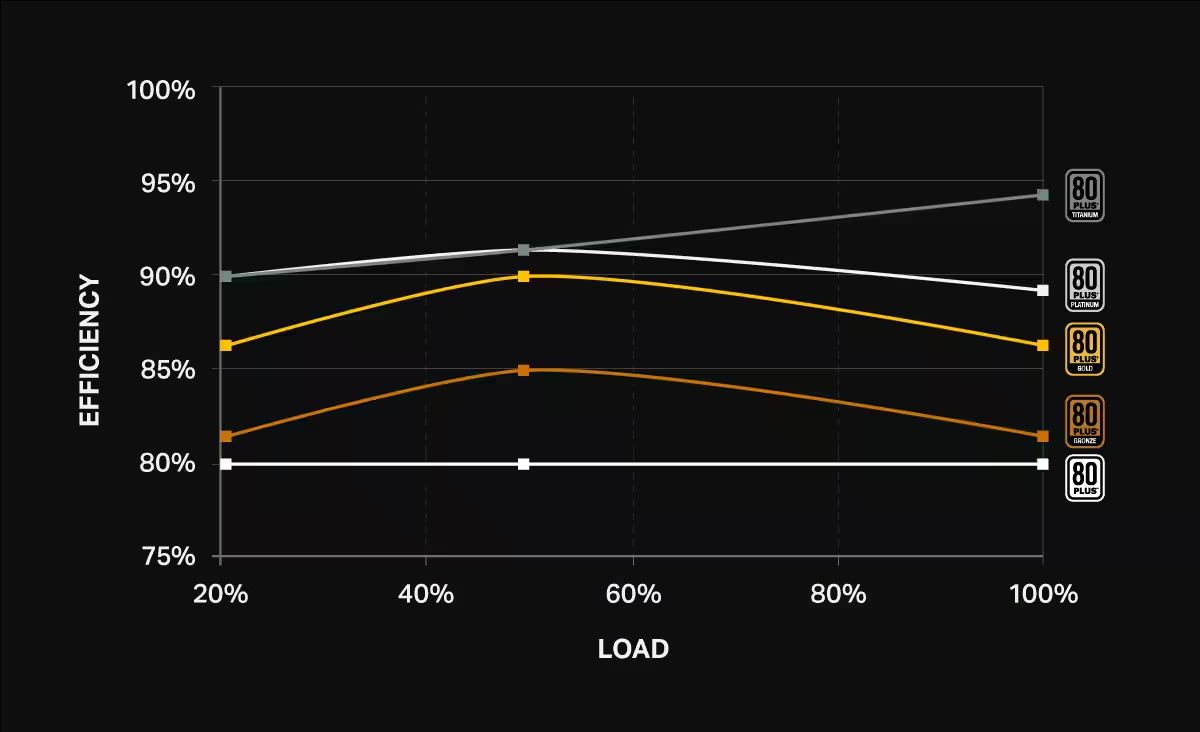
Current approach (maximizing Titanium PSU efficiency):
- All components on 1600W Titanium PSU (1200W = 75% load)
- ~93% PSU conversion efficiency (Titanium rating)
- 200W power limit per GPU (vs 350-370W stock)
- Allows running on standard 120V outlets (no 240V needed)
- Reduces heat output significantly
- Extends GPU lifespan
Automation: The set_power_limits.sh Script
Manually setting power limits for each GPU is tedious. Here's my script that does it for all four GPUs in one command:
#!/bin/bash

for i in 0 1 2 3; do sudo nvidia-smi -i $i -pl 200; done
Save this as ~/models/set_power_limits.sh, make it executable with chmod +x, and run it whenever you boot up. It takes 2 seconds instead of 2 minutes.
Pro Tip: Make It Persist
I've added my power limit script to my system's startup sequence so it runs automatically on boot. This ensures consistent power management without manual intervention.
Bonus Benefits: Cooler, Longer-Lasting GPUs
Running GPUs at 200W instead of 370W has noticeable secondary benefits:
- Lower temperatures: GPUs run 15-25°C cooler (verified via
nvidia-smi) - Reduced cooling requirements: Less heat means fans spin slower, quieter operation, less thermal stress
- Extended GPU lifespan: Operating at lower temperatures and power levels reduces electronic wear and tear
Thermal Impact in Practice
My GPUs that used to hit 82-85°C under load now stabilize at 58-62°C. The difference in fan noise alone is worth the setup, but the long-term reliability impact is even more significant.
The Bottom Line
Optimizing power consumption isn't just about cutting costs (though that's a significant win—my monthly inference-related electricity costs should drop by ~43%). It's about creating a more sustainable, efficient, and maintainable system.
If you have a multi-GPU rig, I highly recommend experimenting with power limits. I don't see any reason to not impose power limits, unless you observe a meaningful degradation in performance. There's no reason to burn excess electricity and the system will be happier and last longer.
Next Steps
I'm planning to add real-time power monitoring to my setup and will share the dashboard once it's operational. If you have suggestions or similar setups, I'd love to hear about them!
What's your power setup? Leave me a comment on X