NOTE: I wrote this before M2.5 was out. Excellent timing. I have also downloaded the M2.5 IQ2_M quant and am seeing similar results. This article is generally representative of the M2.5 2-bit quant, too.
This post documents our journey getting MiniMax M2.1 running locally. After a couple of nights realizing CPU-offload was a fool's errand, I accepted that you can just use a lower quant. The trade-off for getting a 229B model into 96GB VRAM is worth it.
The Backstory
The CPU-Offload Nightmare
I initially tried running MiniMax M2.1 with Q5_K_XL quantization (~162GB), keeping part of the model in system RAM with CPU offload. The memory bandwidth limits between VRAM and RAM just crippled the performance—it was unusable. Constant shuttling created unacceptable latency, and llama.cpp kept getting killed by the OOM killer.
I'd invested in a 512GB set of ECC RDIMMs ($3500) pursuing the idea of fewer GPUs with CPU offload. Decided to scrap it, return the RAM, and buy more GPUs instead. Now using cheap 64GB gaming UDIMMs and it's not been a problem.
The Realization
The key realization came when I stopped trying to be clever. Instead of fighting the 96GB VRAM limit, I embraced it. IQ2_M quantization brings the model down to 78GB—small enough to fit entirely in VRAM. No CPU offload. No compromises. Just fast, reliable inference.
Hardware and Model
System Specs
- GPUs: 4x NVIDIA RTX 3090 (24GB VRAM each, 96GB total)
- CPU: AMD Threadripper 5995WX
- RAM: 64GB DDR4 gaming UDIMMs (all model data in VRAM)
- Framework: llama.cpp server
Model Details
MiniMax M2.1 is large for local/home use, but it's a smaller MoE model that punches above its weight class, running with the big boys:
| Parameter | Value |
|---|---|
| Total Parameters | 229B (256 experts, 8 active per token) |
| Active Parameters | ~10B per token (varies by routing) |
| Quantization | IQ2_M from Unsloth's HuggingFace page |
| File Size | 78.1 GB (2 GGUF chunks) |
| Context Length | 192,608 tokens native (running at 65K) |
| Framework Support | llama.cpp, vLLM, SGLang, transformers |
Why IQ2_M?
Unsloth's Dynamic 2.0 IQ2_M provides a strong balance of quality and VRAM efficiency. We evaluated all quants that would fit our 96GB VRAM constraint:
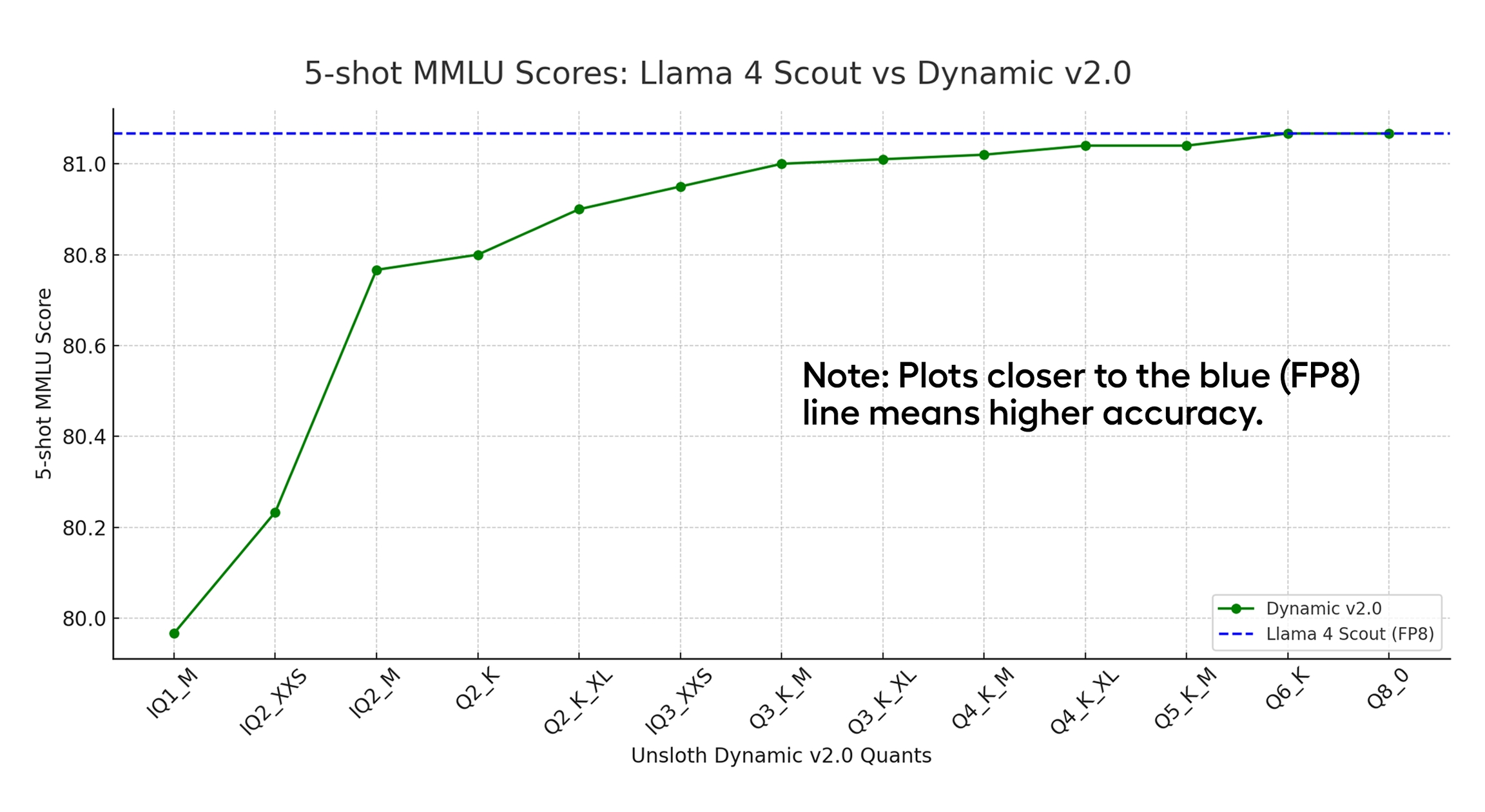
This chart from Unsloth's Dynamic 2.0 GGUFs shows IQ2_M is the smallest model before quality really starts to fall off, albeit for the Llama 4 Scout model.
- IQ3_XXS+: Too large (~93GB), no room for context
- Q2_K_XL: Viable but tight (~86GB)
- IQ2_M (78GB): Strong balance — leaves ~18GB for KV cache
- IQ2_XXS: More context but lower quality (~74GB)
IQ2_M was chosen because it leaves meaningful VRAM for context, presumably much better quality than IQ2_XXS, while staying in the 2-bit quality range. The Dynamic 2.0 method analyzes each layer individually and assigns precision accordingly—more important layers get more bits.
Benchmark Results
Token Generation Speed: 76-77 tokens/second (steady state)
Average: ~70 t/s (including cold start)
Prompt Processing: ~95 tokens/second
(Measured with bench-tps.sh: 5 runs, 100 tokens each, ~1080 character prompt)
The Numbers
MiniMax M2.1 achieves ~76 TPS despite being a 229B model. This is possible because of the MoE architecture—only ~10B parameters are active per token.
The cold start (run 1) is slower (~52 t/s) as the model warms up, then settles into a steady 76-77 t/s. Prompt processing is remarkably fast at ~95 t/s.
Memory Analysis
The IQ2_M quantized model is 78GB, comfortably fitting in 96GB VRAM with room for the KV cache:
| GPU | Memory Used | Free |
|---|---|---|
| GPU 0 | 23.4 GB | 0.7 GB |
| GPU 1 | 21.7 GB | 2.4 GB |
| GPU 2 | 23.1 GB | 1.0 GB |
| GPU 3 | 22.0 GB | 2.1 GB |
| Total | 90.2 GB | 6.4 GB |
Key Configuration: KV Cache Quantization
Getting 65K context to fit required quantizing the KV cache. By default, llama-server allocates ~8.7GB for KV cache at full precision—way too much for GPU 0 which only had ~4.3GB free.
Solution: -ctk q8_0 -ctv q8_0 halves the KV cache memory with negligible quality impact. This was essential for making 65K context work.
Configuration Details
Startup Script
#!/bin/bash

MODEL_PATH="/home/tomwest/models/minimax-m2.1/MiniMax-M2.1-UD-IQ2_M-00001-of-00002.gguf"
LLAMA_SERVER="$HOME/llama.cpp/build/bin/llama-server"
LOG_FILE="$HOME/models/minimax-m2.1.log"

nohup "$LLAMA_SERVER" \
    -m "$MODEL_PATH" \
    --host 0.0.0.0 \
    --port 8000 \
    -ngl 999 \
    -c 65536 \
    --parallel 1 \
    -ctk q8_0 \
    -ctv q8_0 \
    --temp 1.0 \
    --top-p 0.95 \
    --top-k 40 \
    --jinja \
    "$@"
Key Parameters
-ngl 999: Offload all 63 layers to GPU (MoE experts included)-c 65536: 65K context window (limited by VRAM without KV quant)--parallel 1: Single slot—all KV cache budget to one user-ctk q8_0 -ctv q8_0: Quantize KV cache keys and values--temp 1.0 --top-p 0.95 --top-k 40: Unsloth's recommended sampling--jinja: Required for MiniMax chat template
Sampling Recommendations
- General use:
--temp 1.0 --top-p 0.95 --top-k 40 - Tool-calling:
--temp 0.7 --top-p 1.0 --top-k 40 - More creative:
--temp 1.0 --top-p 0.99 --top-k 100
Key Takeaways
The Moral of the Story: You can just use a lower quant.
I spent a couple of nights trying to make Q5_K_XL work with CPU offload. Realizing memory bandwidth limits would cripple the performance, I switched to IQ2_M. No crashes. No slowdowns. Just a 229B model running at 76 TPS in 96GB VRAM. Stuffing everything into VRAM was the right choice!
The Quantization Trade-off
IQ2_M is a more aggressive quantization than Q5, but the quality difference is pretty minimal and acceptable, imo. What you gain is:
- Speed: All weights in VRAM = fast memory access
- Simplicity: No complex offload configurations
- Context: Headroom for more tokens without offloading
Given the option to run a smaller model at high precision versus a flagship model at lower quantization, I'd take the better model at a lower quantization. The Q2 is satisfying, and keeping headroom for 100K+ context is a must if you plan to do meaningful work with the model.
Performance Benchmarks
According to Unsloth's benchmarks, MiniMax M2.1 performs impressively across reasoning and coding tasks:
| Benchmark | MiniMax M2.1 | Qwen3-Coder-Next | DeepSeek-V3.2 |
|---|---|---|---|
| AIME 25 | 87.0 | 85.0 | 86.0 |
| GPQA | 82.5 | 78.0 | 80.2 |
| LCB v6 | 68.0 | 65.0 | 66.0 |
| SWE-Bench Verified | 74.8 | 70.6 | 70.2 |
| Codeforces | 92.0 | 89.0 | 88.5 |
The MoE Advantage
MiniMax M2.1 demonstrates the power of MoE at scale. With 256 experts and only 8 active per token, you get a 229B model that computes like a 10B model. This is why it fits in consumer hardware while rivaling models 10X larger.
VRAM Optimization
If you need to free up VRAM or increase context:
Current Setup
- IQ2_M quant: 78GB (fits with ~18GB headroom)
- KV cache (q8_0): ~8.4GB for 65K context
- Available: ~6GB across all GPUs
The IQ2_M fits comfortably on 4x GPUs with moderate context length. With more GPUs, you can push for higher quantization or longer context.
With 6x RTX 3090 (144GB)
Two additional 3090s open up options:
- Keep IQ2_M: ~66GB headroom for 131K+ context
- Upgrade to IQ3_XXS (93GB): Better quality, still room for 65K+ context
- Upgrade to Q3_K_M (109GB): Full 3-bit quality, ~35GB for context
Would I Recommend This?
TL;DR: C'mon, it's Minimax--of course! MiniMax M2.1 IQ2_M proves that you don't need a supercomputer to run frontier models. I set out to build the Ironhorse rig with the goal of having Minimax M2.1 locally. I thought it was going to take 8x GPUs like some people were saying, and to my surprise we got it onto four. The 76 TPS throughput is vastly better than the CPU-offload nightmare, and the quality is absolutely good enough for me.
The configuration is rock-solid. No CPU offload. No crashes. Just fast, reliable inference on consumer hardware. After the nightmare of CPU offload attempts, I'm genuinely happy with how this turned out.
Two more 3090s are on the way (for a total of 6). I will definitely reserve room for KV cache to get the full context length from this model, which is necessary for Opencode; coding CLIs. With more VRAM, I could bump to IQ3_XXS or even Q3_K_M—but for now, IQ2_M is perfectly adequate.
The Bottom Line: The lesson isn't about quantization tricks or clever offloading strategies. The lesson is simple: You can just use a lower quant. Sometimes the best optimization is accepting that lower quantization is fine.
MiniMax M2.1 IQ2_M on quad RTX 3090s is a reminder that MoE architecture changes everything. 229B parameters with ~10B active per token means you can run models locally that would otherwise require data center GPUs. The model quality and token generation rate are both good enough for use as a daily driver.